Your usual places.
Inside your session.
Browse the actual YouTube, SoundCloud and BeatStars sites. Keep favourites and make playlists across sources.
Loading Barz…
FIND IT. FEEL IT. RECORD IT.
YouTube, SoundCloud and BeatStars. Inside FL Studio.
Barz is a Windows VST3 beat browser. Find your beat, load its WAV into FL’s Playlist and keep your lyrics beside you while recording.
30-day trial 30-day trial · Monthly, yearly or 3-year accessSee how to set it up →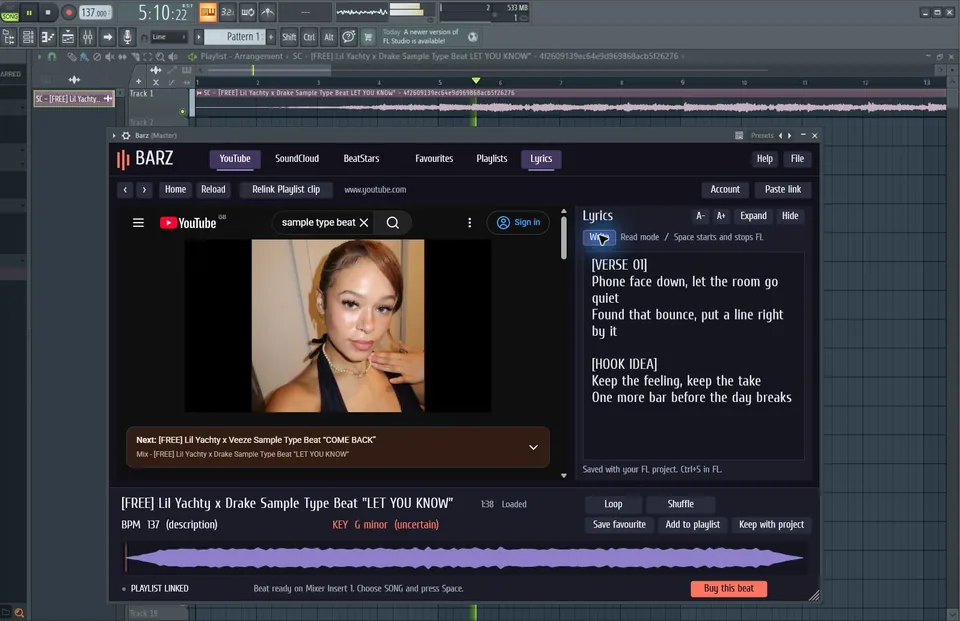
Choose a beat. The Playlist WAV updates, FL’s tempo changes, and Space starts playback.
YouTube / SoundCloud / BeatStars
LESS SETUP. MORE TAKES.
Browse the actual YouTube, SoundCloud and BeatStars sites. Keep favourites and make playlists across sources.
On Windows, your beat appears as a Playlist waveform, routed to Mixer Insert 1. A new selection updates the linked clip.
Use FL’s transport, keep lyrics beside the beat, and save a local copy with your project for the next session.
YOUTUBE IN FL STUDIO
Open the real YouTube site in Barz, select a beat and get a linked waveform in the Playlist. FL handles playback while you write and record.
How to use YouTube in FL Studio ↗Barz puts YouTube, SoundCloud and BeatStars browsing inside FL Studio. Select a beat, load its WAV into the Playlist and keep your lyrics beside you while recording.
The current beta is for Windows and FL Studio. macOS support is in development; a tested Mac installer is not available yet.
After a 30-day trial, choose £4.99/month, £49.95/year, or £79.99 once for three years with no automatic renewal. A card is required. Registration is currently closed while launch setup is completed; join the newsletter for updates. The signup screen explains the payment terms before you continue.
Yes. Keep with project saves a local audio copy. You can also drag the waveform into FL’s Playlist or a compatible sampler. Already exported WAVs remain normal audio files.
You still need the producer’s permission or the appropriate beat licence. Browsing or downloading through Barz does not give you release rights. Use the producer’s purchase or contact details.
Browsing and account verification require an internet connection. The plugin checks your account during use. Local WAVs already exported into FL can be played independently.
YOUR NEXT TAKE IS WAITING